Learning to use a compass in VR
Could we use VR to teach navigation, so that you could confidently step out onto a windy mountainside in the real world? Building my first lesson — from instrumenting the learner's body to creating natural compass interactions and self-paced feedback.
Over the last month, I have been exploring the idea of teaching land navigation (think map and compass) in virtual reality. Could we use VR to deliver lessons and hone your skills, so that you could step out onto a windy mountainside in the real world with confidence?
Step one was looking at the fundamental components we would need: a map, a compass and an environment to navigate within. Which you can read more about in my earlier post: Could we teach navigation in full VR?
However, the next challenge was to prototype an actual lesson. This post is about some of the interesting things I learnt whilst building out that first lesson.
Bear in mind when you see the videos this is still a prototype, so do not expect fully polished graphics and audio yet.
Narrowing down the scope
Navigation is a big topic and the beauty of VR is that you could teach more than what is normally possible in a classroom. You can control reality to jump into a different part of the world, switch to night time and navigate by the stars or start travelling through time to see how magnetic north moves year on year. I had to narrow down the scope. For the first step, I decided to focus on the basics of using a compass to take a magnetic bearing to something in the world around you.
This meant I had to teach someone:
- What angles and a bearing were (or at least some quick revision)
- How to use a compass to measure those angles
- How to pick up and interact with that compass in VR
Instrumenting the learner's body
Teaching someone how to take a bearing with a compass is all about angles, so before I got too deep into the subject I needed to make sure they had a good understanding of what an angle was. Which gave an opportunity to try instrumenting the student's body.
Using the controllers in the student's hands, I can work out what angle they are pointing at relative to North. I can then use this to give visual feedback, letting the student play around with their hands to better understand what an angle is. Then when it comes to the assessment phase I can set them challenges like, "point at 270 degrees" and detect when they have gotten it right.
By using their bodies, the student can get started immediately without having to learn any special bits of equipment. Then start to build a mental connection between the abstract angles in numbers and the relationship to the physical world around them.
Instrumenting the student's hands to teach the fundamentals of angles
Creating natural interactions
Instrumenting their hands in order to learn the basics of angles gave a very quick way to jump in. However, the learning objective is around measuring those angles using a compass.
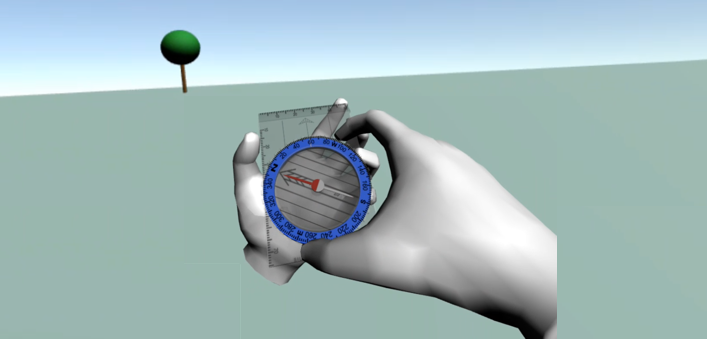
In my earlier post I demonstrated a compass that you could pick up, it had a red arrow always pointing north and you could twist the dial. However, it was pretty clunky. The compass just floated in the hand rather than looking like the hand was actually gripping it. And the interaction to twist the dial was totally unrelated to real life, you had to rotate a button on the controller rather than grip onto the dial and twist your own hand. As teaching the physical skills of how to use the compass were critical to the lesson, I had to make this a lot better.
I started to realise it did not matter that the world around you was low-fi, it did not negatively impact the learning. But the things that you were going to pick up, touch and use with your hands were the most important to focus on. Getting the placement of fingers looking natural as you grip the compass, or the sense of rotating your second hand to turn the dial just like in real life, was what mattered. Without those interactions feeling right, it was hard to suspend your disbelief and focus on the lesson.
Allowing self-paced learning
One of the skills of teaching is knowing when to step back and let a student try to work something out on their own, then knowing when to jump in with the right prompt to help them along later.
With a skilled human teacher, this is something they can do very flexibly, using their own intuition in the moment to give the right advice. The trade-off is that unless you have a very small class, then it is hard to keep a close eye on everyone in the room.
In a VR environment, everything can be measured. For example in the case of using a compass you can keep track of every stage: where is the compass pointing, have they twisted the dial the right amount, did they read off the numbers correctly. So when the student is struggling the software can look back at everything they have been doing to give them prompts and advice. Each learner can get the attention like they were getting personal tuition. Though by moving this into software you can lose that flexibility that a real-life trainer can offer, as any feedback will have to be pre-planned and pre-programmed.
If you get the balance of the feedback right students who have mastered the topic should be able to demonstrate their skills pretty quickly and without any interference. Those who were struggling could get advice in a way that did not feel too rigid or scripted, as it would respond dynamically to their progress.
Giving appropriate feedback to the student
What is next?
My original question was could we teach navigation in virtual reality. And every step I take in building out this idea is convincing me that it would work.
My original explorations showed you could pull in mapping data and generate real-world terrains to test out the skills. And this second step has shown me how to structure lessons, integrating assessments as the student progress and delivering dynamic feedback.
Though building out a full syllabus, designing all the VR interactions and moving towards production-ready audio and graphics; will all take a lot more time and require creating a team to make it happen.